Policy routing (gfwlist / chinadns)
Client-side; Linux + macOS + Windows.
By default the client is a full tunnel: every packet that reaches the TUN is encrypted to the server, and what you route into the TUN is your business (see Routing & IP forwarding). For the common case of "send only some destinations through the tunnel", the client has a built-in policy-routing mode — no external daemon, and no ipset/iptables/nft required.
How it works
A small split-DNS proxy runs inside the client. For each query it decides whether the name should be tunneled and, for those that should be, programs a per-destination host route (<ip>/32) into the tun device using the OS's native routing socket — rtnetlink on Linux, PF_ROUTE on macOS, the IP Helper API on Windows — so the work is done entirely in user mode. The route's source is the tun address, so the server's masquerade matches with no client-side NAT. Direct (non-tunneled) traffic stays on the normal kernel path untouched, and every route added is removed again on exit.
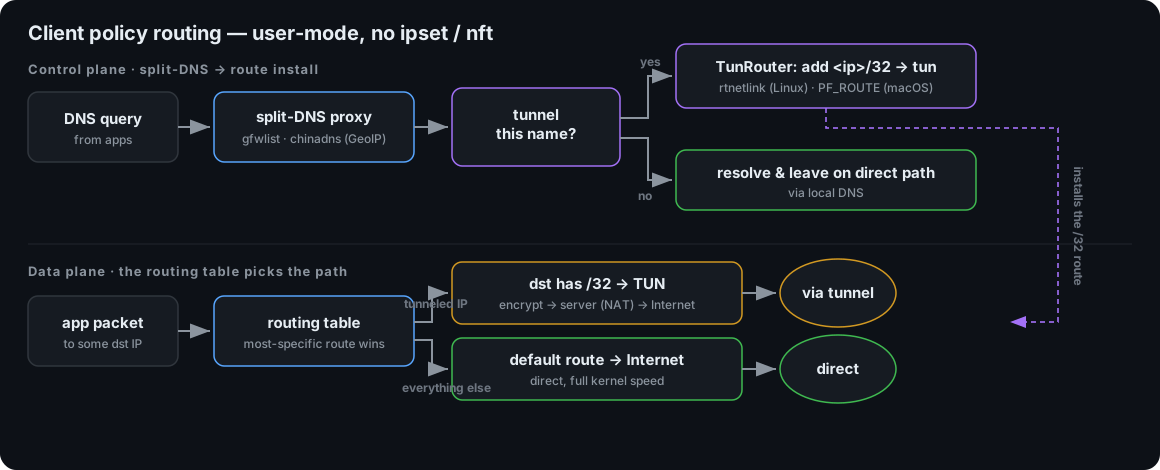
The proxy is built for low latency:
- Cache — answers are cached (TTL-respecting, like
dnsmasq) so repeat lookups skip the upstream round-trip. - chinadns fast-path — the local and clean resolvers are queried concurrently, but a domestic answer returns immediately instead of waiting for the slower tunneled upstream, so China sites resolve at local-DNS speed.
- Pre-warm — on startup a built-in list of common domains is resolved in the background, so their first real lookup (and their tunnel routes) are already hot. Customize with the
prewarmconfig list or disable with--no-prewarm. - Persistence — the cache is saved on exit and reloaded on startup (
--cache-file, defaultdns-cache.jsonnext to the binary;--no-cache-persistto disable), so a restart doesn't start cold.
Modes
| Mode | Decision | Needs |
|---|---|---|
gfwlist | tunnel names listed in a gfwlist file; everything else is direct | --gfwlist |
chinadns | query a domestic + a clean resolver; tunnel anything not resolving to an in-China address. An optional --gfwlist is a force-tunnel override | --chnroute or --geoip (+ optional --gfwlist) |
full | no policy routing (the default) | — |
# gfwlist mode: tunnel only the domains in gfwlist.txt
sudo ./target/release/shadowvpn-client -c client.json \
  --mode gfwlist --gfwlist /etc/shadowvpn/gfwlist.txt

# chinadns mode: tunnel everything that isn't a China IP (CIDR file)
sudo ./target/release/shadowvpn-client -c client.json \
  --mode chinadns --chnroute /etc/shadowvpn/chnroute.txt

# chinadns mode: derive the China set from a GeoLite2 database instead
sudo ./target/release/shadowvpn-client -c client.json \
  --mode chinadns --geoip /etc/shadowvpn/GeoLite2-Country.mmdb

# chinadns mode + a gfwlist force list: domains on the list always tunnel,
# even if the domestic resolver returns an in-China (poisoned) address
sudo ./target/release/shadowvpn-client -c client.json \
  --mode chinadns --geoip /etc/shadowvpn/GeoLite2-Country.mmdb \
  --gfwlist /etc/shadowvpn/gfwlist.txt
System DNS handling
Policy routing only takes effect for names resolved through the split-DNS resolver (that's what installs the routes). Host DNS is intercepted on the TUN: IPv4 UDP packets to port 53 are answered in user-mode and are not encrypted to the server. The client does not rewrite the OS nameserver (networksetup / /etc/resolv.conf / netsh). Public resolver IPs are attracted onto the TUN with host routes so lookups still reach intercept without pointing the stub resolver at 127.0.0.1.
Configuration
All client-only; CLI overrides JSON:
| JSON field | CLI flag | Meaning | Default |
|---|---|---|---|
mode | --mode | full | gfwlist | chinadns | full |
dns_listen | --dns-listen | address the split-DNS proxy listens on | 127.0.0.1:53 |
dns_local | --dns-local | domestic / direct DNS upstream | 114.114.114.114:53 |
dns_remote | --dns-remote | clean DNS upstream (reached through the tunnel) | 8.8.8.8:53 |
gfwlist | --gfwlist | domain-suffix file (gfwlist mode; optional force-tunnel list in chinadns mode) | — |
chnroute | --chnroute | China CIDR file (chinadns mode) | — |
geoip | --geoip | GeoLite2/GeoIP2 .mmdb; builds the China set from it | — |
geoip_country | --geoip-country | ISO country code to select from the GeoIP database | CN |
prewarm | --no-prewarm | pre-resolve common domains into the cache on startup | built-in list |
cache_file | --cache-file / --no-cache-persist | persist the DNS cache across restarts | dns-cache.json (next to the binary) |
Data files
- gfwlist file — one domain per line;
#/!comments and a leading*./.are accepted (the plain list produced bygfwlist2dnsmasq, not the base64 blob). A name matches if it equals or is a subdomain of a listed suffix. - chnroute file — one
a.b.c.d/lenper line (the classic APNIC-derivedchnroute.txt). - geoip database — a MaxMind
GeoLite2-Country.mmdb(or paid GeoIP2). On startup every IPv4 network whose country is--geoip-country(defaultCN) is enumerated and merged into the China set, so you don't have to maintain a CIDR file. Takes precedence over--chnroutewhen both are given.
Bundled data files
If a gfwlist.txt or GeoLite2-Country.mmdb sits next to the shadowvpn-client binary, it is auto-discovered when the relevant mode needs it but no path is configured:
gfwlistmode falls back to a bundledgfwlist.txt(the routing list).chinadnsmode with no--chnroute/--geoipfalls back to a bundledGeoLite2-Country.mmdb, and — with no--gfwlist— also auto-applies a bundledgfwlist.txtas its force-tunnel override (names on the list always take the clean tunneled path). This matches the iOS client, whose network extension always injects its bundledgfwlist.txtin chinadns mode.
So the packaged clients run these modes out of the box; an explicit --gfwlist/--geoip/--chnroute path is only needed to override a bundled copy.
The gfwlist is vendored in the repo at assets/gfwlist.txt (regenerate from the upstream AutoProxy list with scripts/gen-gfwlist.sh); the release packages bundle it next to the client — the Unix tarballs and the Windows zip — and the macOS desktop .app ships it inside Contents/MacOS/. The GeoLite2 database is not vendored (it is large and separately licensed): the Windows zip downloads it at package time, and the desktop .app ships a copy.
Requirements & scope
This needs root / Administrator (to create the tun and edit the routing table) and runs on Linux, macOS, and Windows; routes are programmed directly via the OS routing interface (rtnetlink, PF_ROUTE, or the Windows IP Helper API), so no ipset/iptables/route/netsh binaries are involved for routing. The docker/run-e2e-policy.sh test exercises both modes end to end.
The server still needs forwarding + NAT so tunneled traffic can egress — see Routing & IP forwarding.